Verify your wallet
City Bot gives you Key Holder (1+ key) or Key Master (5+ keys) from the keys in the wallets you have on file. You never connect a wallet or sign anything. You prove a wallet is yours by sending 0 ETH from it to itself. Only the owner can send from a wallet, so that is the whole proof, and nothing goes to anyone else.
Already gave us a wallet?
If you posted a wallet in #wallet-drop or gave one to the bot before, it is probably already on file and counting. Check first:
- Go to #verify-beta in the City of Stonks Discord.
- Press My wallets. It lists your verified wallets, and the wallet we have on file for you (given to us, not yet proven) with how many keys it holds.
If the right wallet is there and holds your keys, you are done.
Verify a wallet
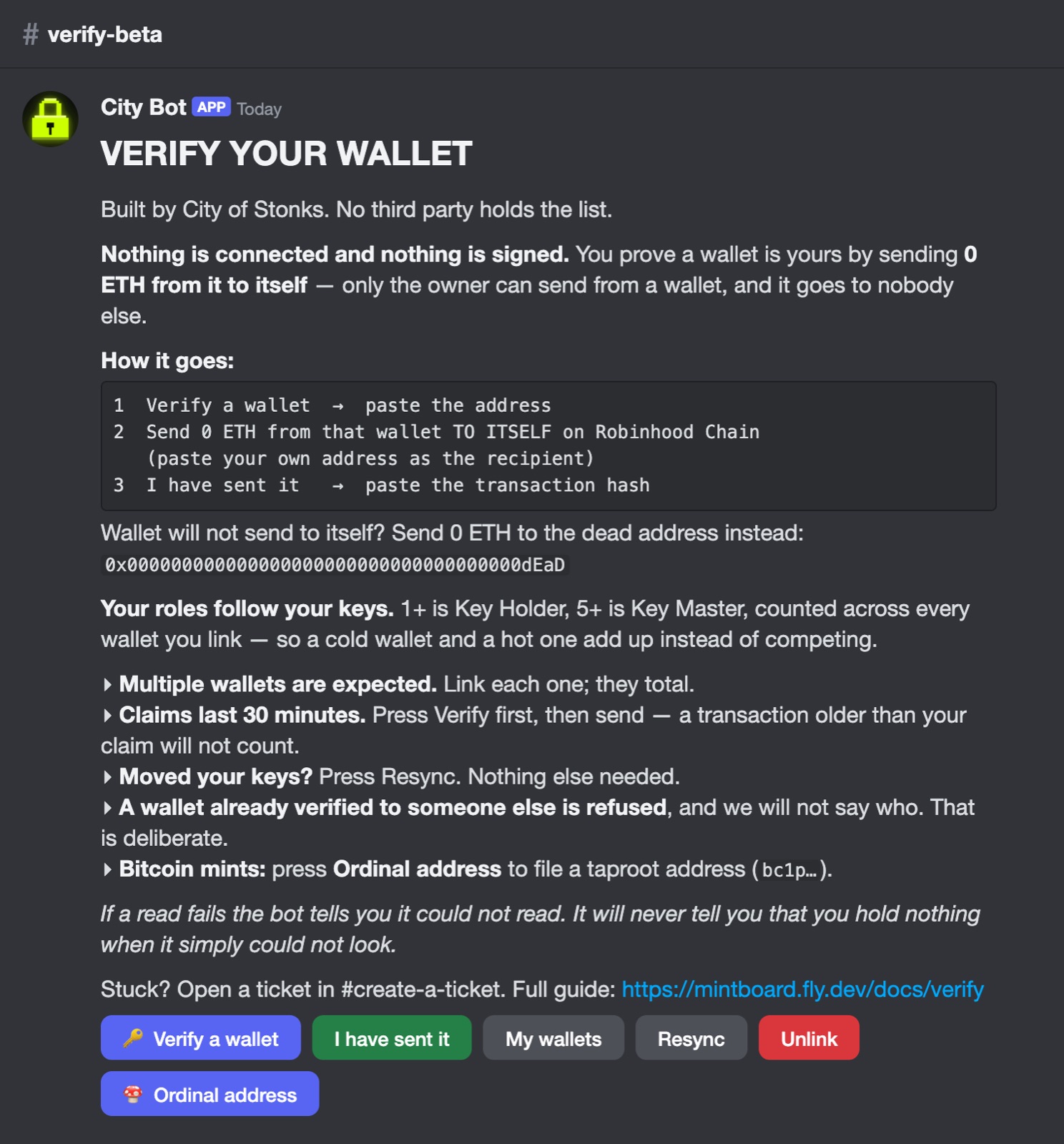
- In #verify-beta, press Verify a wallet and enter the wallet that holds your keys.
- From that same wallet, send 0 ETH to your own address on Robinhood Chain, as a plain send. Paste your own address as the recipient. If your wallet will not let you send to yourself, send 0 ETH to the dead address
0x000000000000000000000000000000000000dEaDinstead. Nobody owns it. - Press I have sent it and paste the transaction hash (it starts with
0xand is 66 characters long). - City Bot checks the chain and gives you your role. You have 30 minutes from pressing Verify.
The mistakes that cause most tickets:
| What went wrong | Why City Bot refuses it | Fix |
|---|---|---|
| You sent a token (USDC, a meme coin…) | On chain, a token transfer goes to the token's contract, not to your own address. | Send 0 ETH as a plain send. |
| You pasted your address | That is not a transaction, so there is nothing to find. | Paste the hash of the transaction you sent. |
| You sent on Ethereum, Base or another network | City Bot only looks on Robinhood Chain. | Send again on Robinhood Chain. |
| You sent from a different wallet | The transaction has to come from the wallet you are verifying. | Send from the wallet you entered. |
| You sent to another address | Only a send to yourself (or the dead address) counts. | Send 0 ETH to your own address. |
More than one wallet
Verify each wallet that holds keys. Your role counts every key across all of them, so 3 + 2 in two wallets makes you a Key Master.
The other buttons
| Button | What it does |
|---|---|
| Resync | Recounts the keys in your wallets and updates your role. Use it after you buy more. |
| Unlink | Removes a wallet from your account. |
| Ordinal address | Adds a Bitcoin (taproot) address for Ordinals mints. It does not count toward your role. |
Still stuck?
Open a ticket in #create-a-ticket, paste your wallet address, and the team will check it by hand. Nobody from the team will DM you first or ask for your seed phrase.